
- Creating and Publishing a Form
- Instant Forms
- Conversational Form
- Create Multi Step Forms In WordPress
- Using Calculations in SureForms: A Step-by-Step Guide
- Calculation Formula Guide
- SureForms Login Block – Step-by-Step Guide
- SureForms Registration Block – Step-by-Step Guide
- SureForms – PDF Generation Feature
- GDPR Compliant Forms
- Adjust Form Notification Emails
- Form Confirmation
- Entries Management Feature Guide
- How to Add Query Parameters to Form Redirects
- How to Fetch Query Parameters from URL
- Set the “From Email” in SureForms
- Setting Up “Reply-To” Email Using Form Input Tags – SureForms
- Restrict Form Entries in SureForms
- Form Scheduling in SureForms
- Conditional Confirmations in SureForms
- SureForms Integration with ActiveCampaign
- SureForms Integration with AgileCRM
- SureForms Integration with Airtable
- SureForms Integration with LatePoint
- SureForms Integration with FluentCRM
- Connect SureForms To Zapier
- Automate WordPress Forms with the Custom App Builder
- SureForms Integration with Telegram
- SureForms Integration with Breeze
- SureForms Integration with Brevo
- Unable to Upload SureForms ZIP: File Unzipped On Download
- Browser Support for SureForms
- Not Getting Update Notifications
- How To Rollback to Previous SureForms Versions
- Publishing Failed: Invalid JSON Response
- Troubleshooting Email Sending In SureForms
- SureForm Submissions Marked as Spam – How to Fix
- API Request Failed – Nonce Verification Error
- Fixing the “Destination folder already exists” Error When Installing SureForms
- How to Set Up SureForms with Caching Plugins
- srfm_enable_redirect_activation
- sureforms_plugin_action_links
- srfm_quick_sidebar_allowed_blocks
- srfm_integrated_plugins
- srfm_suretriggers_integration_data_filter
- srfm_form_submit_response
- srfm_enable_gutenberg_post_types
- srfm_languages_directory
- srfm_form_template
- srfm_disable_nps_survey
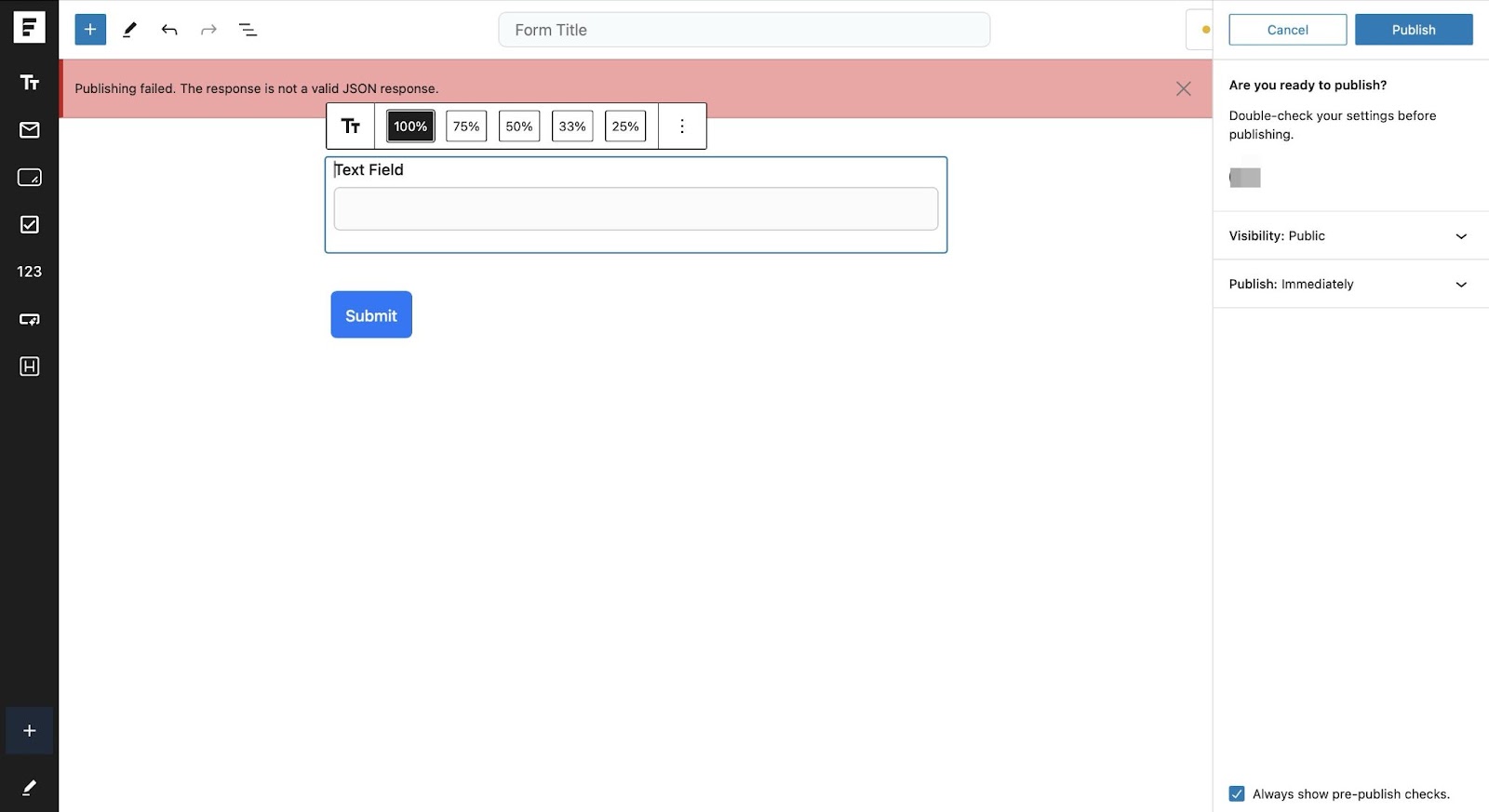
Publishing Failed: Invalid JSON Response
If you encounter the error “Publishing failed: The response is not a valid JSON response” while using SureForms, this guide provides steps to troubleshoot and resolve the issue.
1. Check Permalinks Settings
- Navigate to Settings > Permalinks in your WordPress dashboard.
- Without changing any settings, click Save Changes.
- This refreshes the .htaccess file and resolves potential rewrite rule issues.
2. Disable Plugins
- Temporarily deactivate all plugins.
- Test SureForms functionality after deactivating each plugin.
- If the issue is resolved, reactivate the plugins one by one to identify the conflicting plugin.
3. Verify Site URL and HTTPS Configuration
- Navigate to Settings > General.
- Confirm that the WordPress Address (URL) and Site Address (URL) are correct and consistently use HTTP or HTTPS.
- If you recently switched to HTTPS, ensure the SSL certificate is properly installed.
4. Debug REST API
- Use a plugin like Health Check & Troubleshooting to analyze the REST API status.
- Investigate any reported errors for possible causes of the issue.
5. Check Server Configuration
- Firewall or ModSecurity: Hosting providers may have security modules (like ModSecurity) that block REST API requests. Contact your hosting provider to whitelist REST API endpoints.
- PHP Version: Ensure the server is running PHP version 7.4 or higher.
6. Enable Debugging in WordPress
- Open the wp-config.php file.
Add the following lines to enable error logging:
define(‘WP_DEBUG’, true);
define(‘WP_DEBUG_LOG’, true);
- define(‘WP_DEBUG_DISPLAY’, false);
- Review the debug.log file in the /wp-content/ directory for detailed error information.
7. Test with a Default Theme
Switch to a default theme, such as Twenty Twenty-Two, to determine if the issue is theme-related.
8. Correct File Permissions
Ensure that your WordPress files and directories have the correct permissions:
- Files: 644
- Directories: 755
9. Resolve Mixed Content Issues
- If your site uses HTTPS but some resources load over HTTP, this can block JSON responses.
- Use a plugin like Really Simple SSL to fix mixed content issues automatically.
10. Contact Hosting Support
If the issue persists after following the above steps:
- Contact your hosting provider.
- Request a review of server logs and configurations related to REST API and JSON response handling.
By following these steps, you should be able to resolve the JSON response error and restore full functionality to SureForms. If you require further assistance, please reach out to our support team.
We don't respond to the article feedback, we use it to improve our support content.