
- Creating and Publishing a Form
- Instant Forms
- Conversational Form
- Create Multi Step Forms In WordPress
- Using Calculations in SureForms: A Step-by-Step Guide
- Calculation Formula Guide
- SureForms Login Block – Step-by-Step Guide
- SureForms Registration Block – Step-by-Step Guide
- SureForms – PDF Generation Feature
- GDPR Compliant Forms
- Adjust Form Notification Emails
- Form Confirmation
- Entries Management Feature Guide
- How to Add Query Parameters to Form Redirects
- How to Fetch Query Parameters from URL
- Set the “From Email” in SureForms
- Setting Up “Reply-To” Email Using Form Input Tags – SureForms
- Restrict Form Entries in SureForms
- Form Scheduling in SureForms
- Conditional Confirmations in SureForms
- SureForms Integration with ActiveCampaign
- SureForms Integration with AgileCRM
- SureForms Integration with Airtable
- SureForms Integration with LatePoint
- SureForms Integration with FluentCRM
- Connect SureForms To Zapier
- Automate WordPress Forms with the Custom App Builder
- SureForms Integration with Telegram
- SureForms Integration with Breeze
- SureForms Integration with Brevo
- Unable to Upload SureForms ZIP: File Unzipped On Download
- Browser Support for SureForms
- Not Getting Update Notifications
- How To Rollback to Previous SureForms Versions
- Publishing Failed: Invalid JSON Response
- Troubleshooting Email Sending In SureForms
- SureForm Submissions Marked as Spam – How to Fix
- API Request Failed – Nonce Verification Error
- Fixing the “Destination folder already exists” Error When Installing SureForms
- How to Set Up SureForms with Caching Plugins
- srfm_core_loaded
- srfm_form_submit
- srfm_after_submission_process
- srfm_localize_conditional_logic_data
- srfm_form_css_variables
- srfm_page_break_header
- srfm_page_break_pagination
- srfm_page_break_btn
- srfm_register_additional_post_meta
- srfm_before_submission
- srfm_before_email_send
- srfm_after_email_send
- How to Change Checkbox Submission Value from “On” to “Yes” or Custom Text in SureForms
- srfm_after_deleting_entry_files
- srfm_before_prepare_submission_data
- srfm_register_additional_blocks
- srfm_entry_render_field_custom_value
- srfm_entry_custom_value
- srfm_enable_redirect_activation
- sureforms_plugin_action_links
- srfm_quick_sidebar_allowed_blocks
- srfm_integrated_plugins
- srfm_suretriggers_integration_data_filter
- srfm_form_submit_response
- srfm_enable_gutenberg_post_types
- srfm_languages_directory
- srfm_form_template
- srfm_disable_nps_survey
srfm_form_css_variables
Description
This action runs when SureForms is printing CSS variables. You can use this hook to add your custom CSS variables or override the existing SureForms CSS variables dynamically in the form markup.
This allows for customization of form styles, such as colors and other design attributes.
Parameters
$css_variables (array) – An associative array including the following keys and their values:
- id – The form ID.
- primary_color – The primary color value.
- help_color – The help color value.
The above colors refer to the “Primary Color” and “Text Color” which are present under the Style Tab in the editor.
Use Case
For example, if you want to change the text and background color of the back button for a form with a page break, we have the following variables for the same:
--srfm-page-break-back-btn-text-color
--srfm-page-break-back-btn-backgroundThe same can be modified by using hsl() form of the color or just a simple hex code or color name will work fine as well.
Hook Source
 /**
* hook source
*/
do_action(
  'srfm_form_css_variables',
       [
             'id'            => $id,
             'primary_color' => $primary_color_var,
              'help_color'    => $help_color_var,
       ]
);
Hook Usage
You can attach a function to the srfm_form_css_variables action using add_action(). In this function, you can define and output your custom CSS variables.
add_action(‘srfm_form_css_variables’, 'your_custom_function', 10, 1);

function your_custom_function( $css_variables )
{
   $primary_color = $css_variables[‘primary_color’];
 ?>
  --srfm-slider-shadow-color: hsl( from <?php echo esc_html( $primary_color ); ?> h s l / 0.10 );
 <?php
   //Add code here
}Code Snippet
You can use the following code snippet as an example:
/**
 * Customize the CSS variables for a SureForms form or add additional variables.
 *
 * @param array<string, string> $params Parameters sent by the 'srfm_form_css_variables' action.
 */
function customize_form_css_variables( $params ) {
    $primary_color  = $params['primary_color'];
    $help_color_var = $params['help_color'];
    ?>
            --srfm-page-break-back-btn-text-color: #000;
            --srfm-page-break-back-btn-background: #f2eaa6;
    <?php
}
add_action( 'srfm_form_css_variables', 'customize_form_css_variables', 10, 1 );Output
Here’s the output for srfm_form_css_variables:
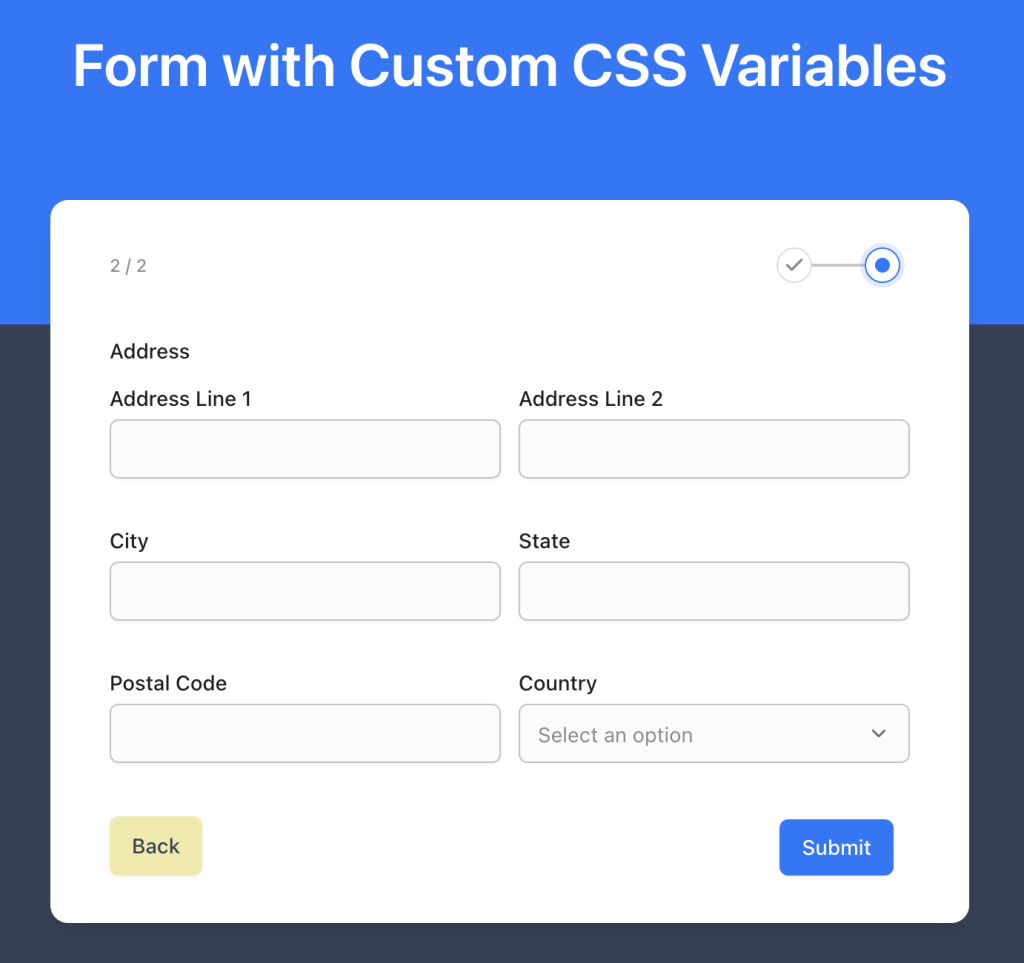
That’s all! We hope this has been helpful. If you have any other doubts, feel free to contact us by opening a support ticket below.
We don't respond to the article feedback, we use it to improve our support content.