
- Creating and Publishing a Form
- Instant Forms
- Conversational Form
- Create Multi Step Forms In WordPress
- Using Calculations in SureForms: A Step-by-Step Guide
- Calculation Formula Guide
- SureForms Login Block – Step-by-Step Guide
- SureForms Registration Block – Step-by-Step Guide
- SureForms – PDF Generation Feature
- GDPR Compliant Forms
- Adjust Form Notification Emails
- Form Confirmation
- Entries Management Feature Guide
- How to Add Query Parameters to Form Redirects
- How to Fetch Query Parameters from URL
- Set the “From Email” in SureForms
- Setting Up “Reply-To” Email Using Form Input Tags – SureForms
- Restrict Form Entries in SureForms
- Form Scheduling in SureForms
- Conditional Confirmations in SureForms
- SureForms Integration with ActiveCampaign
- SureForms Integration with AgileCRM
- SureForms Integration with Airtable
- SureForms Integration with LatePoint
- SureForms Integration with FluentCRM
- Connect SureForms To Zapier
- Automate WordPress Forms with the Custom App Builder
- SureForms Integration with Telegram
- SureForms Integration with Breeze
- SureForms Integration with Brevo
- Unable to Upload SureForms ZIP: File Unzipped On Download
- Browser Support for SureForms
- Not Getting Update Notifications
- How To Rollback to Previous SureForms Versions
- Publishing Failed: Invalid JSON Response
- Troubleshooting Email Sending In SureForms
- SureForm Submissions Marked as Spam – How to Fix
- API Request Failed – Nonce Verification Error
- Fixing the “Destination folder already exists” Error When Installing SureForms
- How to Set Up SureForms with Caching Plugins
- srfm_enable_redirect_activation
- sureforms_plugin_action_links
- srfm_quick_sidebar_allowed_blocks
- srfm_integrated_plugins
- srfm_suretriggers_integration_data_filter
- srfm_form_submit_response
- srfm_enable_gutenberg_post_types
- srfm_languages_directory
- srfm_form_template
- srfm_disable_nps_survey
Importing & Exporting Forms
With SureForms, you can import and export forms to easily move them between websites or save them for later use. This is perfect when you want to transfer forms to another WordPress site, share them, or keep a backup.
You can quickly export your existing forms and import them whenever you need, without losing any settings or details.
In this article, we’ll walk you through the steps to make the most out of this feature.
Note: Ensure you’ve installed and activated SureForms on your site before moving forward.
Exporting Your Forms
Exporting your forms is important for keeping backups or moving forms to another site. To do this:
- Go to SureForms > Forms.
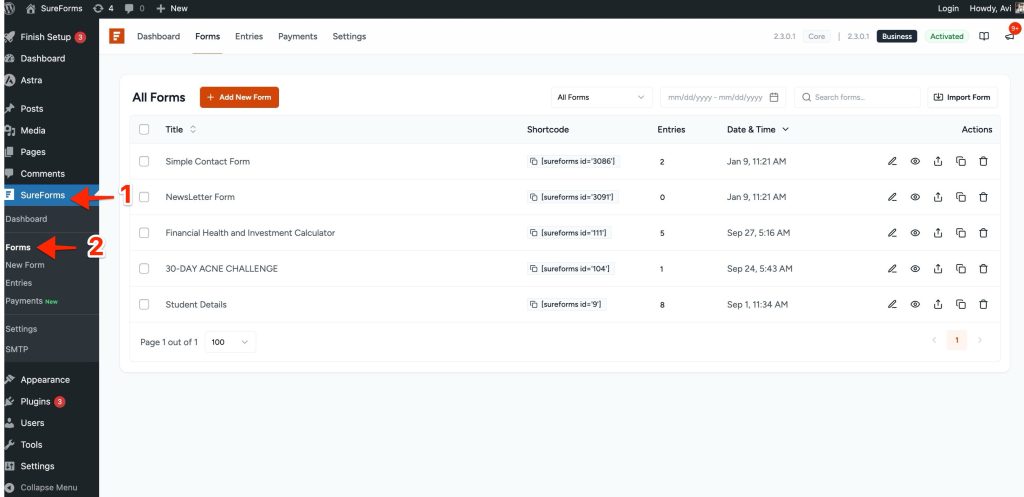
- To export a form, click the “Export” button you see after hovering over the form.
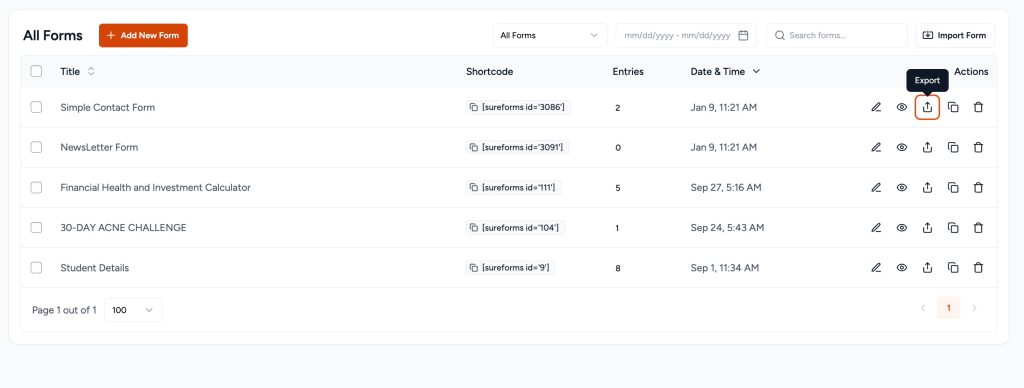
The chosen form will then be downloaded as a JSON file to your computer. If you want to export multiple or all forms on your site, do the following:
- Select the forms you want to export by checking these boxes. You can select multiple or all of them.
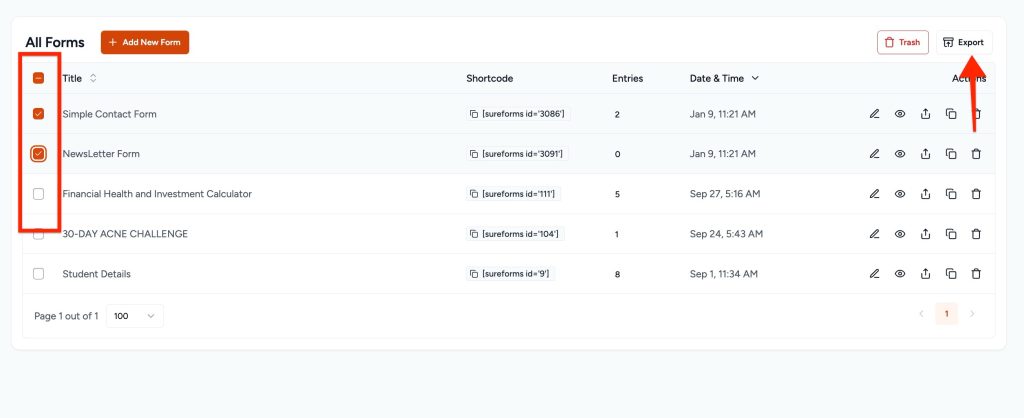
- Click the “Export” button to export the file.
The selected forms will be downloaded as a JSON file on your computer.
Importing Your Forms
To import your forms, follow these steps:
- Click the “Import Form” button
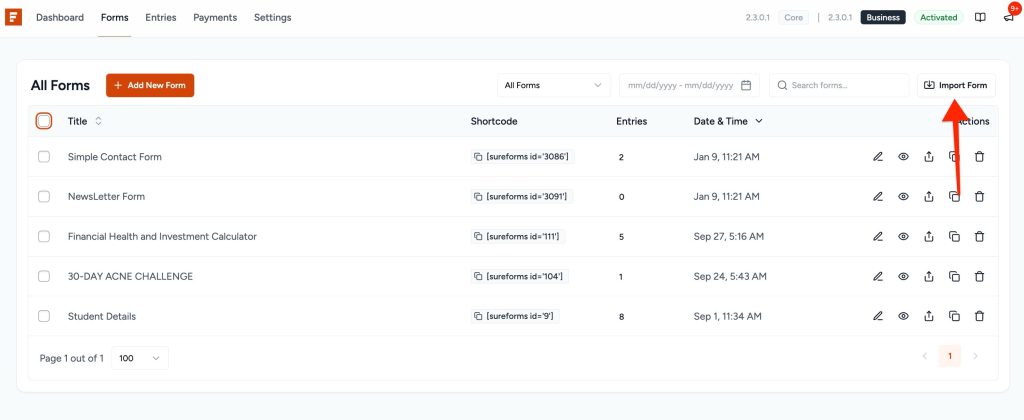
- A pop-up will appear.
- Upload the JSON file with the preferred form data.
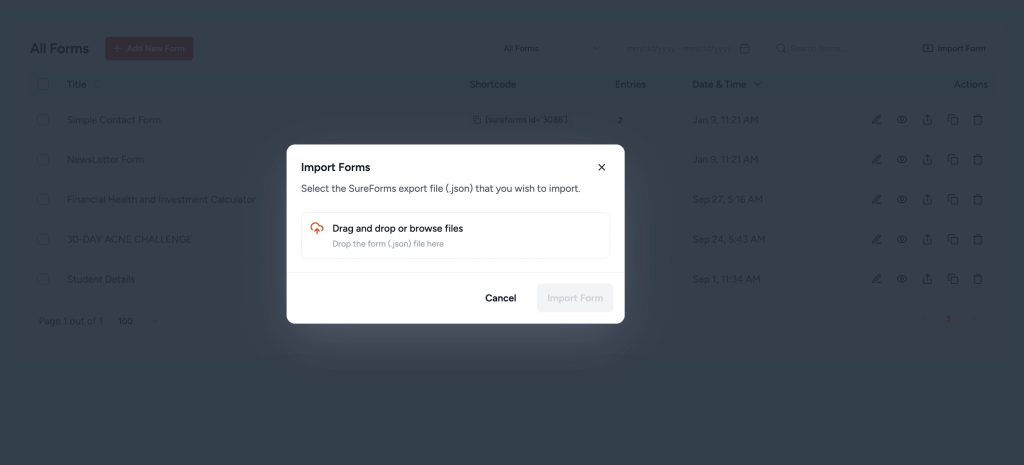
Finally, click on the “Import Form” button. The form will be imported, including all its settings and fields, and it will appear in your forms list in the Draft mode.
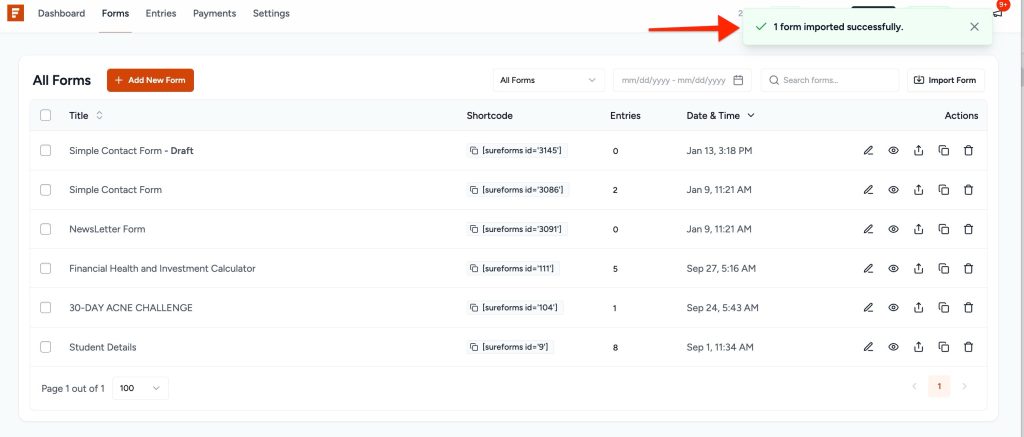
You can edit them as per your preferences and publish them as you see fit.
And if you have any questions, feel free to reach out to us. We’re always here to help!
We don't respond to the article feedback, we use it to improve our support content.